Introduction
In the modern digital economy, businesses are rapidly shifting from traditional bookkeeping methods to cloud-based accounting systems. Cloud accounting software enables real-time financial tracking, automation, and seamless collaboration—making it an essential tool for startups, freelancers, and growing small businesses.
Unlike desktop accounting tools, cloud solutions allow business owners to access financial data anytime, anywhere, and from any device. This flexibility, combined with automation and AI-driven insights, has transformed how companies manage finances in 2026.
In this comprehensive guide, we’ll explore the top 10 cloud accounting software solutions, compare their features and pricing, and provide expert insights to help you choose the right platform.
What Is Cloud Accounting Software?
Definition
Cloud accounting software is an online financial management system hosted on remote servers. Instead of installing software locally, users access it via a web browser or mobile app.
How It Works
- Data is stored securely in the cloud
- Transactions sync automatically with bank feeds
- Financial reports update in real time
- Multiple users can collaborate simultaneously
Cloud accounting eliminates manual data entry and reduces reliance on spreadsheets.
Benefits of Cloud Accounting Software
1. Real-Time Financial Visibility
Cloud tools provide instant access to:
- Cash flow
- Profit and loss
- Outstanding invoices
This helps businesses make faster and smarter decisions.
2. Automation of Financial Tasks
Modern platforms automate:
- Expense categorization
- Invoice generation
- Tax calculations
AI-powered tools can even detect anomalies and suggest corrections .
3. Remote Access & Collaboration
Teams and accountants can work together in real time without sending files back and forth .
4. Cost Efficiency
Many cloud tools offer affordable monthly subscriptions—or even free plans—making them accessible for small businesses.
5. Scalability
Cloud accounting systems grow with your business, supporting additional users, currencies, and integrations.
Key Features to Look for in Cloud Accounting Software
1. Bank Integration
Automatic bank feeds import transactions directly into your system.
2. Invoicing & Billing
- Custom invoice templates
- Recurring billing
- Payment reminders
3. Expense Tracking
- Receipt scanning
- Automatic categorization
- Mileage tracking
4. Financial Reporting
Look for tools offering:
- Balance sheets
- Cash flow reports
- Profit & loss statements
5. Multi-User Access
Some platforms allow unlimited users, improving collaboration.
6. AI & Automation
Advanced tools now include:
- Predictive cash flow
- Smart categorization
- Fraud detection
Top 10 Cloud Accounting Software Solutions in 2026
1. QuickBooks Online
Overview
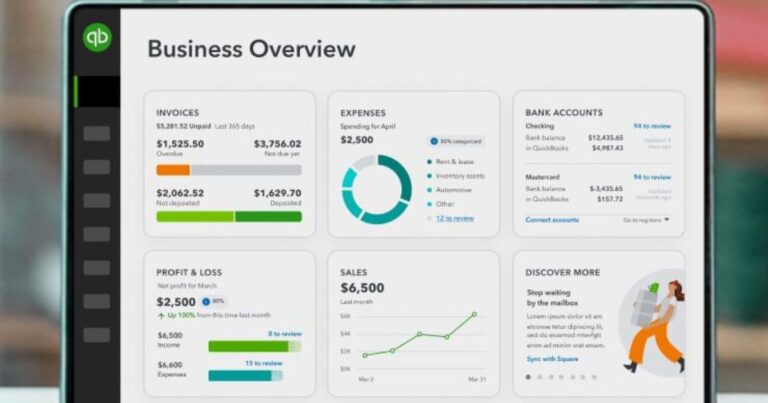
QuickBooks Online is widely considered the industry standard for cloud accounting software.
Key Features
- Automated expense tracking
- Advanced reporting
- Payroll integration
- 750+ integrations
Pricing
- Starts at around $38/month
- Advanced plan up to $275/month
Best For
Small to medium businesses needing comprehensive features.
Expert Review
QuickBooks offers one of the most complete ecosystems and is highly trusted by accountants worldwide.
2. Xero
Overview
Xero is a powerful cloud accounting tool known for its usability and scalability.
Key Features
- Unlimited users
- Strong bank reconciliation
- Multi-currency support
- 1,000+ integrations
Pricing
- Starts at $25–$29/month
Best For
Growing teams and international businesses.
Expert Review
Xero is one of the most collaborative accounting platforms available.
3. Zoho Books
Overview
Zoho Books offers an affordable and feature-rich accounting solution.
Key Features
- Workflow automation
- Inventory management
- Project billing
- AI assistant (Zia)
Pricing
- Free plan available
- Paid plans start at $15/month
Best For
Budget-conscious businesses.
Expert Review
Zoho Books provides excellent value with strong automation features.
4. FreshBooks
Overview
FreshBooks is designed for freelancers and service-based businesses.
Key Features
- Time tracking
- Client portal
- Automated invoicing
- Expense tracking
Pricing
- Starts at $15/month
Best For
Freelancers and consultants.
Expert Review
FreshBooks excels in invoicing and ease of use.
5. Sage Intacct
Overview
Sage Intacct is a premium cloud accounting solution for mid-sized businesses.
Key Features
- Multi-entity management
- Real-time dashboards
- Automated consolidation
Pricing
- Starts around $400/month
Best For
Businesses with complex financial structures.
Expert Review
Ideal for companies needing advanced financial management.
6. Wave Accounting
Overview
Wave is a free cloud accounting software for small businesses.
Key Features
- Free invoicing
- Expense tracking
- Basic reporting
Pricing
- Free (core features)
Best For
Startups and solopreneurs.
Expert Review
A great entry-level option for simple financial needs.
7. Odoo Accounting
Overview
Odoo offers a modular cloud ERP system with accounting features.
Key Features
- Customizable modules
- Integration with CRM and inventory
- Automation tools
Pricing
- Starts low but increases with modules
Best For
Businesses needing an all-in-one system.
Expert Review
Odoo is ideal for companies planning to scale operations.
8. FreeAgent
Overview
FreeAgent is a cloud accounting solution popular among freelancers.
Key Features
- Tax management
- Expense tracking
- Invoice automation
Pricing
- Around $15–$30/month
Best For
Freelancers and micro-businesses.
Expert Review
Strong focus on tax compliance and simplicity.
9. Kashoo
Overview
Kashoo is a simple cloud accounting software for small businesses.
Key Features
- Automatic categorization
- Bank feeds
- Simple dashboard
Pricing
- Around $20/month
Best For
Small businesses needing simplicity.
Expert Review
Best for users who want a no-frills accounting tool.
10. Sage Business Cloud Accounting
Overview
Sage Business Cloud Accounting is a flexible and scalable solution.
Key Features
- Cash flow tracking
- VAT compliance
- Reporting tools
Pricing
- Starts around $10/month
Best For
Small businesses needing compliance tools.
Expert Review
Reliable and compliant with tax regulations.
Comparison Table of Top Cloud Accounting Software
| Software | Starting Price | Best For | Key Feature |
|---|---|---|---|
| QuickBooks | $38/mo | SMBs | Advanced features |
| Xero | $25/mo | Teams | Unlimited users |
| Zoho Books | $15/mo | Budget users | Automation |
| FreshBooks | $15/mo | Freelancers | Invoicing |
| Sage Intacct | $400/mo | Mid-market | Multi-entity |
| Wave | Free | Beginners | Free tools |
| Odoo | Low | Growing businesses | Modular system |
| FreeAgent | $15/mo | Freelancers | Tax tools |
| Kashoo | $20/mo | Simple needs | Ease of use |
| Sage Cloud | $10/mo | Compliance | VAT support |
How to Choose the Best Cloud Accounting Software
Step 1: Understand Your Business Needs
- Freelancers → FreshBooks or Wave
- Growing SMB → QuickBooks or Xero
- Budget users → Zoho Books
Step 2: Evaluate Features
Focus on automation, reporting, and integrations.
Step 3: Compare Pricing
Ensure the tool fits your long-term budget.
Step 4: Test Usability
Always try free trials before committing.
Trends in Cloud Accounting for 2026
AI Integration
AI is now standard for:
- Predictive analytics
- Fraud detection
- Smart categorization
Mobile-First Platforms
Most tools offer powerful mobile apps.
Ecosystem Integration
Accounting tools now integrate with:
- CRM
- HR systems
- E-commerce platforms
Common Mistakes to Avoid
Choosing Based on Price Alone
Low-cost tools may lack essential features.
Ignoring Integration Needs
Ensure compatibility with your existing systems.
Not Planning for Growth
Choose scalable solutions.
Expert Tips for Maximizing Cloud Accounting Software
Automate Everything
Set rules for recurring transactions and invoices.
Monitor Financial Reports Weekly
Stay updated on business performance.
Use Integrations
Connect your accounting software with other tools.
Conclusion
Cloud accounting software has become a necessity for businesses in 2026. Whether you’re a freelancer, startup founder, or small business owner, the right platform can save time, reduce errors, and provide valuable financial insights.
- QuickBooks Online: Best overall
- Xero: Best for teams
- Zoho Books: Best value
- FreshBooks: Best for freelancers
- Wave: Best free option
By evaluating features, pricing, and scalability, you can choose the best cloud accounting software to streamline your finances and grow your business.