Customer Relationship Management (CRM) tools have become essential for businesses of all sizes. Whether you’re running a startup, a small business, or a growing enterprise, CRM software helps you manage customer interactions, streamline processes, and improve profitability.
If you’re new to CRM tools, this comprehensive beginner’s guide will walk you through everything you need to know—from basic concepts to advanced strategies—so you can confidently get started.
What Is a CRM Tool?
A CRM (Customer Relationship Management) tool is a software system designed to help businesses manage interactions with current and potential customers. It centralizes customer data, tracks communication, and automates workflows across departments like sales, marketing, and customer support.
Why CRM Tools Exist
Before CRM tools, businesses relied on spreadsheets, emails, and manual tracking systems. These methods often led to:
- Lost customer data
- Poor communication
- Missed sales opportunities
CRM tools solve these problems by providing a centralized and organized system.
Key Components of a CRM System
Understanding the core components of CRM tools is crucial for beginners.
1. Contact Management
What It Does
Stores and organizes customer information.
Includes:
- Names and contact details
- Communication history
- Purchase records
2. Lead Management
What It Does
Tracks potential customers (leads) through the sales funnel.
Key Features:
- Lead capture
- Lead scoring
- Lead nurturing
3. Sales Pipeline Management
What It Does
Visualizes the stages of a sales process.
Benefits:
- Clear tracking of deals
- Better forecasting
- Improved organization
4. Marketing Automation
What It Does
Automates marketing campaigns and customer engagement.
Examples:
- Email campaigns
- Customer segmentation
- Drip marketing
5. Customer Support Management
What It Does
Helps manage customer service interactions.
Features:
- Ticketing systems
- Chat support
- Issue tracking
Types of CRM Tools
Not all CRM tools are the same. They are generally categorized into three main types.
1. Operational CRM
Focuses on automating business processes.
Includes:
- Sales automation
- Marketing automation
- Service automation
2. Analytical CRM
Focuses on data analysis and insights.
Helps with:
- Customer behavior analysis
- Trend identification
- Performance tracking
3. Collaborative CRM
Focuses on improving communication between teams.
Benefits:
- Shared customer data
- Better coordination
- Improved customer experience
Benefits of CRM Tools for Beginners
CRM tools offer numerous benefits, especially for those just starting out.
1. Better Organization
All customer data is stored in one place, making it easy to access and manage.
2. Improved Customer Relationships
CRM tools help you understand your customers better and personalize interactions.
3. Increased Sales
By tracking leads and automating follow-ups, CRM tools help convert more prospects into customers.
4. Time Savings
Automation reduces manual work, allowing you to focus on strategic tasks.
5. Data-Driven Decisions
CRM analytics provide insights that help improve business strategies.
How CRM Tools Work
Understanding how CRM tools function is essential for beginners.
Step 1: Data Collection
CRM tools collect data from various sources:
- Website forms
- Emails
- Social media
- Customer interactions
Step 2: Data Storage
All collected data is stored in a centralized database.
Step 3: Data Analysis
CRM tools analyze data to provide insights into customer behavior and trends.
Step 4: Automation
Tasks like follow-ups, reminders, and campaigns are automated.
Step 5: Reporting
CRM systems generate reports to track performance and progress.
Popular CRM Tools for Beginners
Here are some beginner-friendly CRM tools:
1. HubSpot CRM
Features:
- Free plan
- User-friendly interface
- Marketing and sales tools
Best For:
Beginners and small businesses
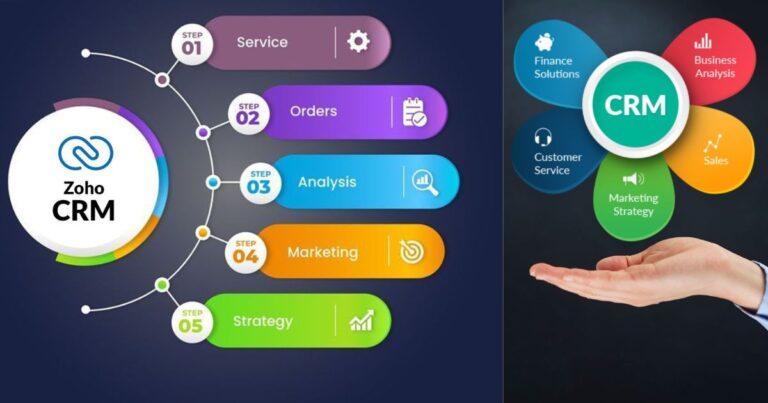
2. Zoho CRM
Features:
- Affordable pricing
- Customization options
- AI-powered assistant
Best For:
Growing businesses
3. Pipedrive
Features:
- Visual sales pipeline
- Easy to use
- Sales-focused
Best For:
Sales teams
4. Freshsales
Features:
- Built-in communication tools
- Automation features
- Lead scoring
Best For:
Small to medium businesses
5. Salesforce
Features:
- Advanced customization
- Powerful analytics
- Scalable platform
Best For:
Large businesses
How to Choose the Right CRM Tool
Choosing the right CRM is a critical decision.
1. Define Your Goals
Ask yourself:
- What problems do I want to solve?
- What features do I need?
2. Set a Budget
CRM tools come in different pricing models:
- Free
- Subscription-based
- Enterprise-level
3. Evaluate Ease of Use
A beginner-friendly CRM should be intuitive and easy to learn.
4. Check Integration Options
Ensure the CRM integrates with your existing tools.
5. Consider Scalability
Choose a CRM that can grow with your business.
Step-by-Step Guide to Getting Started with CRM Tools
Step 1: Choose a CRM Tool
Select a CRM based on your needs and budget.
Step 2: Set Up Your Account
Create an account and configure basic settings.
Step 3: Import Your Data
Upload existing customer data into the CRM.
Step 4: Customize Your CRM
Set up:
- Pipelines
- Fields
- Workflows
Step 5: Train Your Team
Ensure everyone understands how to use the CRM.
Step 6: Start Using the CRM
Begin tracking leads, managing customers, and automating tasks.
Common Mistakes Beginners Should Avoid
1. Choosing the Wrong CRM
Not all CRMs fit every business.
2. Ignoring Training
Lack of training leads to poor adoption.
3. Overcomplicating the System
Keep it simple, especially in the beginning.
4. Not Updating Data
Outdated data reduces effectiveness.
5. Ignoring Automation
Automation is one of the biggest advantages of CRM tools.
Tips for Maximizing CRM Success
1. Keep Data Clean
Regularly update and remove duplicate data.
2. Use Automation
Automate repetitive tasks to save time.
3. Monitor Performance
Track key metrics and improve strategies.
4. Focus on Customer Experience
Use CRM insights to enhance customer interactions.
5. Continuously Improve
Adapt your CRM strategy as your business grows.
CRM Tools and Business Growth
CRM tools play a major role in business growth.
1. Better Lead Conversion
Track and nurture leads effectively.
2. Increased Customer Retention
Maintain strong relationships with customers.
3. Improved Efficiency
Streamline processes and reduce manual work.
4. Scalable Operations
Support business expansion with organized systems.
Future Trends in CRM Tools
1. AI Integration
AI will enhance automation and decision-making.
2. Mobile CRM
More businesses will rely on mobile access.
3. Personalization
CRM tools will deliver highly personalized experiences.
4. Omnichannel Integration
All communication channels will be connected.
Conclusion
CRM tools are essential for modern businesses, especially for beginners looking to grow and manage customer relationships effectively.
By understanding the basics, choosing the right tool, and implementing best practices, you can:
- Improve customer relationships
- Increase sales
- Save time
- Make better decisions
Getting started with CRM tools may seem overwhelming at first, but with the right approach, it can transform your business and set you on the path to long-term success.